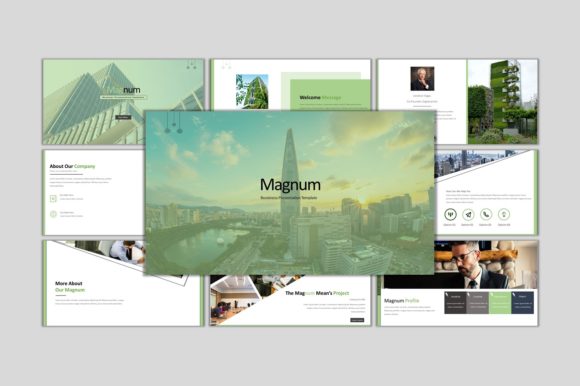
Evaluating the Magnum Business PowerPoint Template for Professional Presentations
Selecting the right presentation framework is a critical step in developing effective business communications. The Magnum - Business PowerPoint Template has emerged as a notable option for professionals seeking a versatile design structure without the need for advanced graphic design skills. This evaluation examines the template's features, usability, and suitability for various presentation scenarios to help you determine if it aligns with your specific project requirements.
Overview of the Magnum Template Structure
The Magnum template is designed as a multipurpose solution suitable for both corporate environments and personal projects. At its core, it provides a comprehensive set of 30 slides that cover essential presentation needs, from title screens and agenda overviews to data visualization and concluding remarks. Unlike complex design files that require external software, this template is built entirely within the Microsoft PowerPoint ecosystem. All elements are fully editable using standard PowerPoint tools, ensuring that users can modify layouts, colors, and content without needing Adobe Illustrator or Photoshop.
A key technical aspect of the Magnum template is its reliance on Master Slides. This architectural choice allows for global changes; altering a font or color scheme on the master slide automatically updates across the entire deck. This feature significantly reduces the time required for branding alignment, making it particularly useful for teams that need to maintain strict visual consistency across multiple presentations.
Design Flexibility and Typography
Visual clarity is paramount in professional presentations, and the Magnum template addresses this through its typographic choices. It utilizes Montserrat and Poppins, two widely recommended free web fonts known for their readability and modern aesthetic. These sans-serif typefaces offer a clean look that translates well on both high-resolution monitors and projected screens. Because these are free fonts, there are no licensing costs or compatibility issues when sharing the file with colleagues or clients who may not have premium font libraries installed.
The template includes over 2000 icons contained within a separate Icon.pptx file. These vector-based graphics are resizable and editable, allowing users to change colors to match their brand identity. The inclusion of a dedicated icon library eliminates the need to search third-party websites for appropriate imagery, streamlining the design process. Furthermore, all graphics within the main presentation are vector-based or high-resolution placeholders, ensuring that the final output remains sharp regardless of scaling.
Usability and Workflow Efficiency
For users evaluating presentation tools, workflow efficiency is often a deciding factor. The Magnum template employs a drag-and-drop functionality for image placeholders. Users can simply insert their own photographs into designated areas, and the template automatically crops and fits the image to the layout. This feature minimizes the risk of distorting images or breaking the slide's composition, a common issue when manually adjusting photos in generic templates.
The editing process is confined strictly to PowerPoint. There is no requirement for additional plugins or software suites. This "what you see is what you get" approach lowers the barrier to entry for users who are comfortable with basic PowerPoint functions but lack advanced design training. The ability to input content, replace images, and adjust color schemes directly within the interface supports a rapid iteration process, which is vital when working under tight deadlines.
Ideal Use Cases and Strategic Fit
The Magnum - Business PowerPoint Template is particularly well-suited for several specific scenarios:
- Corporate Reporting: The clean layout and structured data slides make it ideal for quarterly reviews, financial reports, and strategic planning sessions where clarity is more important than artistic flair.
- Startup Pitch Decks: Entrepreneurs often need to pivot quickly between different versions of their pitch. The master slide functionality allows for rapid rebranding and content updates.
- Educational and Training Modules: The 30-slide count provides enough depth for comprehensive training sessions without requiring the user to build a deck from scratch.
- Consultant Deliverables: Consultants who need to deliver polished, branded documents to clients will benefit from the professional aesthetic and the ease of customizing the color palette to match client branding.
In these contexts, the template serves as a robust foundation that balances professional appearance with functional simplicity. The focus on editable elements ensures that the presenter retains full control over the narrative flow.
Considerations and Potential Limitations
While the Magnum template offers significant advantages, it is important to consider potential tradeoffs before selection. The primary limitation lies in its dependence on the PowerPoint environment. While this ensures ease of use, it may restrict users who prefer cloud-based collaboration tools like Google Slides or Canva, although PowerPoint files can often be imported into these platforms with varying degrees of formatting fidelity.
Additionally, while 30 slides provide a solid range, organizations requiring highly specialized slide types—such as complex interactive dashboards or non-linear navigation structures—might find the standard set insufficient. In such cases, the template would serve as a starting point rather than a complete solution, potentially requiring manual creation of additional custom slides.
Users should also evaluate their need for animation. While the template includes transition-ready layouts, it does not inherently include complex motion graphics. If a presentation relies heavily on dynamic movement to convey information, additional time must be allocated to animate the static elements provided.
Making the Decision
When deciding whether to adopt the MAGNUM - powerpoint Template, consider your team's technical proficiency and timeline. If your goal is to produce a high-quality, visually consistent presentation quickly without investing in design software or hiring a graphic designer, this template represents a strong value proposition. The inclusion of free fonts and a vast icon library further reduces overhead costs and logistical hurdles.
However, if your organization operates exclusively on non-Microsoft platforms or requires highly bespoke, interactive elements that go beyond standard slide mechanics, alternative solutions or custom design services may be more appropriate. For most standard business, educational, and personal presentation needs, the balance of editability, design quality, and ease of use makes the Magnum template a practical and efficient choice.
Ultimately, the value of the template lies in its ability to let users focus on content rather than design mechanics. By handling the visual heavy lifting, it allows presenters to concentrate on refining their message and engaging their audience.