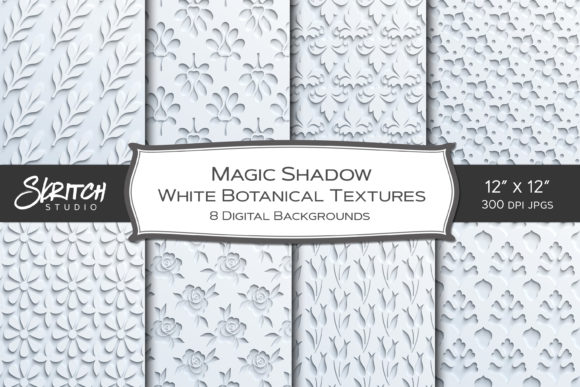
Unlocking Depth: A Guide to Magic Shadow Botanical Design Textures
In the evolving landscape of digital art and graphic design, the pursuit of tactile realism within a two-dimensional medium remains a primary challenge for creators. While flat design has its place, there is a enduring demand for visuals that convey weight, texture, and physical presence. This is where Magic Shadow Botanical Design Textures serve as a transformative resource. These assets are not merely background images; they are sophisticated digital papers engineered to create the illusion of deep embossing or intricate cut paper, bringing a three-dimensional quality to projects that exist solely on screens or standard print media.
The core appeal of these designs lies in their ability to mimic traditional crafting techniques without the associated mess, cost, or time consumption. By utilizing advanced shadow mapping, these textures simulate the way light interacts with layered paper, creating valleys and peaks that trick the eye into perceiving depth. For professionals and hobbyists alike, understanding how to leverage these specific types of assets can elevate the perceived value of their work, turning a simple digital composition into something that feels handcrafted and substantial.
The Mechanics of Digital Embossing and Cut Paper Illusions
To fully appreciate the utility of Magic Shadow Botanical Design Textures, one must understand the technical nuance behind them. Unlike seamless tiling patterns, which are designed to repeat infinitely across a canvas without visible breaks, these designs are distinct, self-contained compositions. The "magic" refers to the pre-rendered drop shadows and highlight gradients that are baked directly into the image file. This creates an immediate sense of elevation, as if a botanical element has been physically glued onto a surface or cut out with a precision knife.
This approach differs significantly from standard flat vector graphics. In a typical workflow, a designer might spend hours manually adding layer styles in software like Photoshop or Affinity Designer to achieve a similar effect. They would need to calculate light sources, adjust opacity, and blur settings to make a leaf look like it is casting a shadow on a vine. With these high-quality designs, that heavy lifting is already done. The shadows are optimized to look natural, avoiding the harsh, artificial edges that often plague amateur attempts at digital embossing. This allows the creator to focus on composition and storytelling rather than technical rendering.
It is important to note a critical characteristic of these files: they are not seamless. Because the shadows extend beyond the botanical elements to create the depth effect, tiling them would result in visible interruptions where the shadows cut off. Instead, these are intended to be used as focal points, borders, or full-page backgrounds where the singular nature of the design adds to the aesthetic. This limitation is actually a feature, encouraging designers to treat each texture as a unique piece of art rather than a repetitive filler.
Botanical Elements as Universal Design Language
The collection features eight distinct designs, each centered around organic motifs such as flowers, vines, and leaves. Botanical imagery holds a unique position in design psychology; it is universally recognized and generally perceived as calming, elegant, and timeless. Whether the project is a corporate brand identity seeking a touch of sophistication or a personal journal aiming for a cozy, rustic feel, plant-based imagery bridges the gap between diverse audiences.
When these organic shapes are combined with the deep embossing effect, the result is a heightened sense of realism. A flat image of a vine might look decorative, but a vine that appears to curl over itself, casting a soft shadow on the page below, invites the viewer to imagine touching it. This tactile suggestion is powerful in marketing and branding. For instance, in the realm of web design, using these textures as hero section backgrounds can stop the scroll, offering a visual richness that stands out against the sea of flat, minimalist interfaces dominating the current internet landscape.
The variety within the eight designs ensures versatility. Some may feature dense clusters of foliage suitable for borders or framing, while others might offer more open, airy compositions ideal for overlaying text. The high resolution of 3600 x 3600 pixels ensures that whether the output is a small sticker or a large format wall art print, the details of the leaves and the subtleties of the shadows remain crisp and defined.
Practical Applications Across Industries
The versatility of Magic Shadow Botanical Design Textures extends far beyond simple decoration. Their high DPI (dots per inch) makes them suitable for both digital and printed artwork, opening a vast array of use cases for different sectors.
Stationery and Greeting Cards
One of the most immediate applications is in the creation of birthday cards, greeting cards, and invitations. The cut-paper illusion aligns perfectly with the aesthetic of high-end stationery. Consumers often associate embossed paper with luxury and care. By integrating these digital textures, independent sellers on platforms like Etsy or local print shops can produce cards that look as though they underwent expensive die-cutting processes. The shadows provide the necessary contrast to make the message pop, ensuring the recipient feels the weight of the gesture before even reading the words.
Scrapbooking and Junk Journals
For the community of scrapbookers and junk journal enthusiasts, these assets are invaluable. Traditional scrapbooking involves layers of physical paper, ribbons, and ephemera. Digital scrapbooking allows for the same layering effect without the bulk. These textures can serve as the foundational pages of a digital layout or be cut out and used as embellishments. They are particularly effective for creating ephemera—those small, decorative bits like tags and pockets—that add interactivity to a journal. Because the shadows are already present, users can drag and drop these elements onto a page, and they will instantly look integrated and grounded.
Apparel and Home Decor
In the world of print-on-demand and custom apparel, standing out is crucial. A t-shirt design featuring a flat flower is common; a design that looks like a layered fabric appliqué or an embroidered patch due to the shadow effects is unique. These textures translate well to textiles, adding a faux-dimension that enhances the garment's visual appeal. Similarly, for home decor items like throw pillows, wall art, and gift wrap, the depth provided by these designs adds a level of sophistication that mimics expensive wallpaper or textured fabrics.
Digital Planning and Stickers
The rise of digital planning on tablets has created a massive market for digital stickers and planner inserts. Users of apps like GoodNotes or Notability look for elements that mimic real-life stationery. Magic Shadow Botanical Design Textures are perfect for creating washi tape strips, planner stickers, and functional tags. When a user places a "sticker" with a realistic drop shadow onto their digital calendar, it reinforces the simulation of a physical planner, enhancing the user experience and satisfaction.
Technical Workflow and Compatibility
Integrating these assets into a creative workflow is straightforward, thanks to their universal file format. The package includes eight JPG files at 3600 x 3600 resolution, contained within a zip file for easy download and organization. JPG is a widely supported format, ensuring compatibility with virtually every design program available today.
For users of Procreate on iPad, these files can be imported directly into the canvas. Artists can use the "Alpha Lock" feature to colorize the botanical elements or change the blend mode to "Multiply" to let the texture of the underlying paper show through, further enhancing the realism. In desktop environments, software like Adobe Photoshop and Affinity Designer offers even more control. Designers can isolate the botanical elements from the background using selection tools, although the pre-baked shadows mean that extracting the object perfectly may require careful masking if the background needs to be completely removed. However, for most use cases, the JPGs are ready to use as-is.
Photographers can also utilize these textures as photography backdrops for product shots. Placing a small jewelry item or a cosmetic bottle over a digitally rendered embossed leaf texture can create a cohesive thematic setting without the need for a physical photoshoot setup. This is particularly useful for e-commerce businesses needing consistent, high-quality imagery for social media blogs and product listings.
Considerations for Effective Implementation
While the benefits are numerous, successful implementation requires an understanding of lighting and composition. Since the shadows in Magic Shadow Botanical Design Textures are fixed, designers should consider the direction of light in their overall composition. If other elements in the design have shadows falling to the left, but the botanical texture has shadows falling to the right, the illusion of reality may break. It is best to use these textures as standalone focal points or ensure that surrounding elements complement the existing light source implied by the texture.
Furthermore, because these are not seamless patterns, scaling them requires care. Enlarging the image beyond its native 3600 x 3600 resolution may lead to pixelation, though this high starting resolution provides a significant buffer. Conversely, shrinking them too much might cause the fine details of the shadows to merge, losing the embossed effect. Testing the texture at the intended output size before finalizing a project is a recommended best practice.
Educators and researchers focusing on digital media literacy can also use these files as teaching tools. They demonstrate how digital tools can replicate physical phenomena, offering a practical case study in lighting, texture mapping, and the psychology of visual perception. By analyzing how the shadows create depth, students can learn fundamental principles of art and design that apply to both 2D and 3D mediums.
Expanding Creative Possibilities
The true power of these designs lies in their ability to inspire. When a creator sees a vine that looks like it is climbing off the page, it sparks ideas for narratives and themes that flat images do not. They encourage a move away from the sterile perfection of vector graphics toward a warmer, more human-centric aesthetic. Whether used for a blog design header, a collage in a mixed-media piece, or a tag on a handmade gift, these textures add a layer of interest that engages the viewer.
In conclusion, Magic Shadow Botanical Design Textures represent a convergence of traditional craft aesthetics and modern digital convenience. They offer a solution for creators who desire the look of embossing and cut paper without the logistical hurdles of physical production. By providing high-resolution, ready-to-use assets that work across a multitude of platforms and industries, they empower users to add depth, character, and professional polish to their projects. As the digital space becomes increasingly crowded, the ability to create work that feels tangible and deeply crafted remains a distinct competitive advantage.